

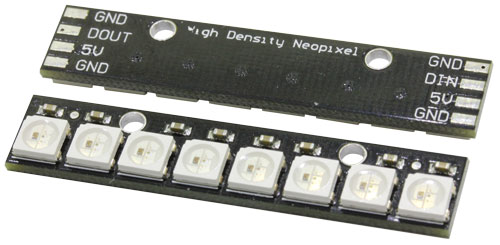

Neopixel – WS2812B
Het aansturen van leds is populair. Een RGB led bestaat uit 3 leds, een rode, een groen en een blauwe. Door deze 3 basiskleuren te mengen kan je alle verschillende kleuren maken.
WS2812B leds (door Adafruit ook Neopixel genoemd) zijn smart-RGB leds met een ingebouwde processor aan boord. Door de juiste stroom van bitjes naar de Din pin van deze led te sturen kan je de intensiteit van de 3 kleuren in deze led bepalen.
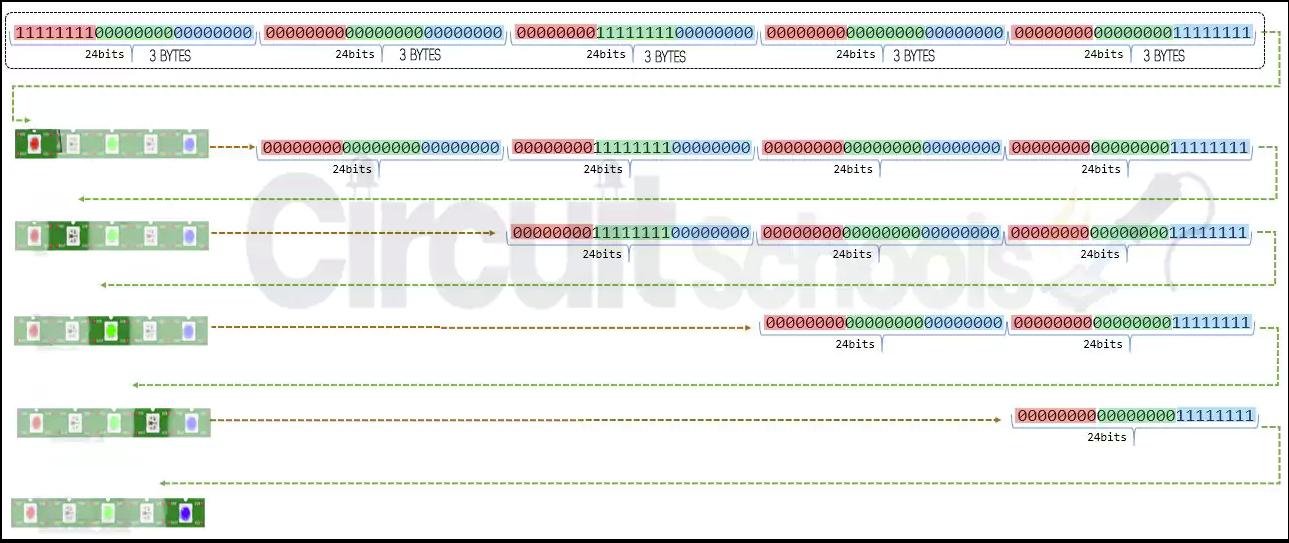
Meerdere WS2812B leds kunnen in serie geplaatst worden. Elke led heeft 3 bytes van 8 bits (samen 24 bits) nodig om de 3kleuren in die led aan te sturen. De intensiteit van elke basiskleur kan bepaald worden met een 8 bit getal. Dat geeft voor elke basiskleur 255 verschillende intensiteiten en samen geeft dat 255x255x255 (=16.581.375) verschillende kleurcombinaties.
De 4e byte die wordt doorgestuurd is de eerste byte van de volgende led.
Aansluiting Neopixel
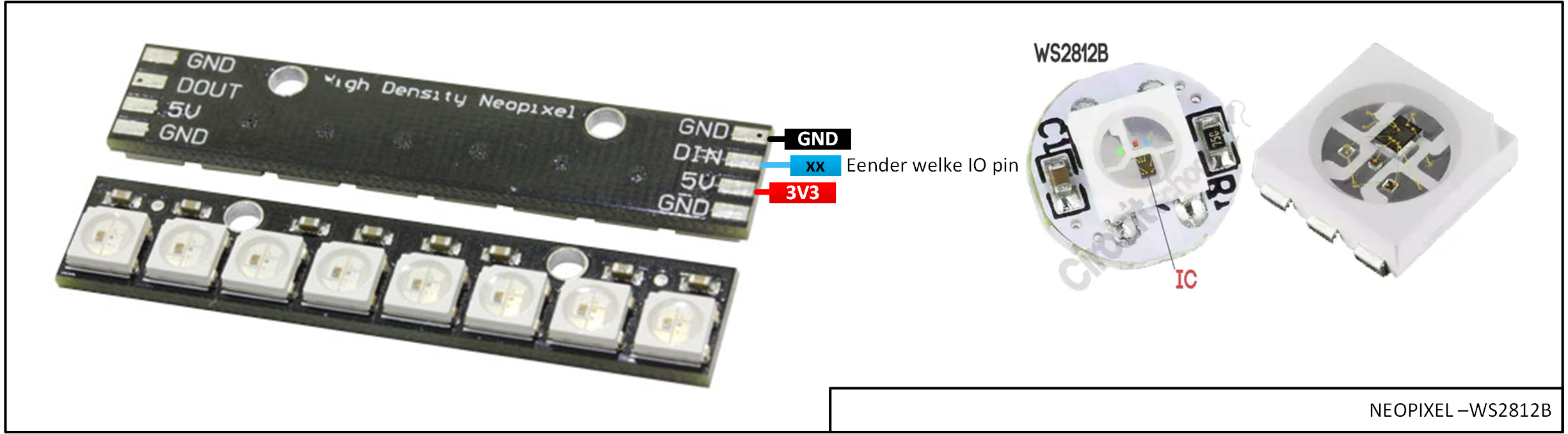
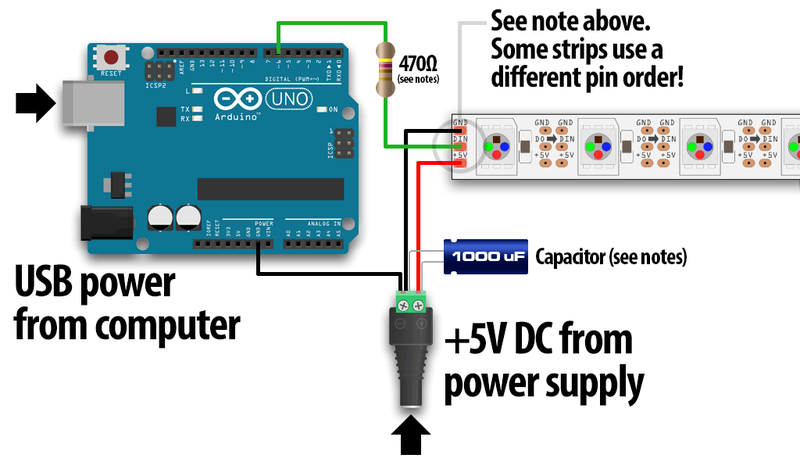
De strip met 8 Neopixel leds werkt perfect als die aangesloten is zoals in het schema hierboven.
Deze leds trekken nogal wat stroom. Als je meer dan 8 Neopixel leds op de processor aansluit is het aangeraden om onderstaande aanpassingen te doen.
// NEOPIXEL BEST PRACTICES for most reliable operation:
// – Add 1000 uF CAPACITOR between NeoPixel strip’s + and – connections.
// – MINIMIZE WIRING LENGTH between microcontroller board and first pixel.
// – NeoPixel strip’s DATA-IN should pass through a 300-500 OHM RESISTOR.
// – AVOID connecting NeoPixels on a LIVE CIRCUIT. If you must, ALWAYS
// connect GROUND (-) first, then +, then data.
// – When using a 3.3V microcontroller with a 5V-powered NeoPixel strip,
// a LOGIC-LEVEL CONVERTER on the data line is STRONGLY RECOMMENDED.
// (Skipping these may work OK on your workbench but can fail in the field)
Demo code Neopixel
Voor deze Neopixel zijn er 2 demoprogramma’s.
Het eerste programma demonstreert mooi hoe je één voor één de kleur van de 8 leds bepaald en daarna alles in 1 keer doorstuurt naar de leds.
Het tweede programma demonstreert heel wat verschillende kleureffecten die met deze neopixel-leds te maken zijn.
Adafruit Neopixel lib installeren
Schets >> Bibliotheken gebruiken >> Bibliotheken beheren…
typ “Neopixel” in het venster rechts boven
installeer de Adafruit Neopixel lib
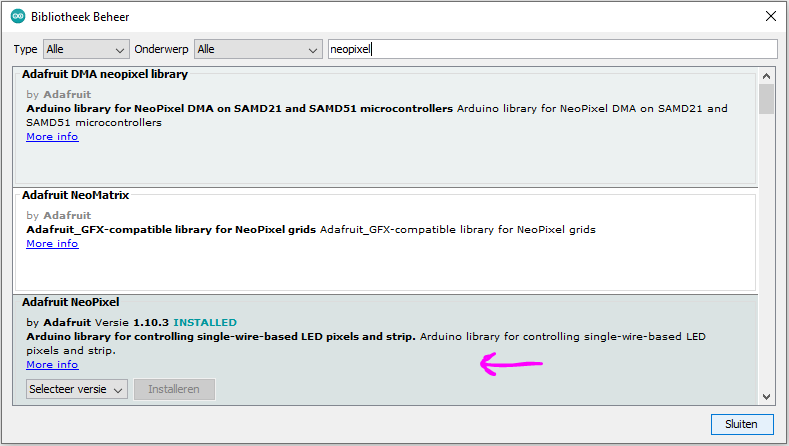
/*
NeoPixel LEDs basis
BBiot - Jan 2022 - E2CRE8.be - www.stemzone.be
installeer eerste de Adafruit Neopixel lib

*/

#include <Adafruit_NeoPixel.h>

#define PIN      6
#define NUMPIXELS 8


Adafruit_NeoPixel pixels(NUMPIXELS, PIN, NEO_GRB + NEO_KHZ800);

#define DELAYVAL 500 // Time (in milliseconds) to pause between pixels

void setup() {
pixels.begin();
}

void loop() {
pixels.clear();
pixels.setBrightness(20);
pixels.setPixelColor(0, pixels.Color(255, 255, 255)); // waarden voor led 0 (WIT)
pixels.setPixelColor(1, pixels.Color(255, 0, 0));     // waarden voor led 1 (ROOD)
pixels.setPixelColor(2, pixels.Color(0, 255, 0));     // waarden voor led 2 (GROEN)
pixels.setPixelColor(3, pixels.Color(0, 0, 255));   // waarden voor led 3 (BLAUW)
pixels.setPixelColor(4, pixels.Color(255, 0, 255));
pixels.setPixelColor(5, pixels.Color(255, 255, 0));
pixels.setPixelColor(6, pixels.Color(0, 255, 255));
pixels.setPixelColor(7, pixels.Color(0, 100, 100));
pixels.show();
}
/*
NeoPixel LEDs uitbreiding
BBiot - Jan 2022 - E2CRE8.be - www.stemzone.be
installeer eerste de Adafruit Neopixel lib

*/

// NEOPIXEL BEST PRACTICES for most reliable operation:
// - Add 1000 uF CAPACITOR between NeoPixel strip's + and - connections.
// - MINIMIZE WIRING LENGTH between microcontroller board and first pixel.
// - NeoPixel strip's DATA-IN should pass through a 300-500 OHM RESISTOR.
// - AVOID connecting NeoPixels on a LIVE CIRCUIT. If you must, ALWAYS
//   connect GROUND (-) first, then +, then data.
// - When using a 3.3V microcontroller with a 5V-powered NeoPixel strip,
//   a LOGIC-LEVEL CONVERTER on the data line is STRONGLY RECOMMENDED.
// (Skipping these may work OK on your workbench but can fail in the field)

#include <Adafruit_NeoPixel.h>
// Which pin on the Arduino is connected to the NeoPixels?
// On a Trinket or Gemma we suggest changing this to 1:
#define LED_PIN    6

// How many NeoPixels are attached to the Arduino?
#define LED_COUNT 8

// Declare our NeoPixel strip object:
Adafruit_NeoPixel strip(LED_COUNT, LED_PIN, NEO_GRB + NEO_KHZ800);
// Argument 1 = Number of pixels in NeoPixel strip
// Argument 2 = Arduino pin number (most are valid)
// Argument 3 = Pixel type flags, add together as needed:
//   NEO_KHZ800  800 KHz bitstream (most NeoPixel products w/WS2812 LEDs)
//   NEO_KHZ400  400 KHz (classic 'v1' (not v2) FLORA pixels, WS2811 drivers)
//   NEO_GRB     Pixels are wired for GRB bitstream (most NeoPixel products)
//   NEO_RGB     Pixels are wired for RGB bitstream (v1 FLORA pixels, not v2)
//   NEO_RGBW    Pixels are wired for RGBW bitstream (NeoPixel RGBW products)


// setup() function -- runs once at startup --------------------------------

void setup() {
  // These lines are specifically to support the Adafruit Trinket 5V 16 MHz.
  // Any other board, you can remove this part (but no harm leaving it):
#if defined(__AVR_ATtiny85__) && (F_CPU == 16000000)
  clock_prescale_set(clock_div_1);
#endif
  // END of Trinket-specific code.

  strip.begin();           // INITIALIZE NeoPixel strip object (REQUIRED)
  strip.show();            // Turn OFF all pixels ASAP
  strip.setBrightness(50); // Set BRIGHTNESS to about 1/5 (max = 255)
}


// loop() function -- runs repeatedly as long as board is on ---------------

void loop() {
  // Fill along the length of the strip in various colors...
  colorWipe(strip.Color(255,   0,   0), 50); // Red
  colorWipe(strip.Color(  0, 255,   0), 50); // Green
  colorWipe(strip.Color(  0,   0, 255), 50); // Blue

  // Do a theater marquee effect in various colors...
  theaterChase(strip.Color(127, 127, 127), 50); // White, half brightness
  theaterChase(strip.Color(127,   0,   0), 50); // Red, half brightness
  theaterChase(strip.Color(  0,   0, 127), 50); // Blue, half brightness

  rainbow(10);             // Flowing rainbow cycle along the whole strip
  theaterChaseRainbow(50); // Rainbow-enhanced theaterChase variant
}


// Some functions of our own for creating animated effects -----------------

// Fill strip pixels one after another with a color. Strip is NOT cleared
// first; anything there will be covered pixel by pixel. Pass in color
// (as a single 'packed' 32-bit value, which you can get by calling
// strip.Color(red, green, blue) as shown in the loop() function above),
// and a delay time (in milliseconds) between pixels.
void colorWipe(uint32_t color, int wait) {
  for(int i=0; i<strip.numPixels(); i++) { // For each pixel in strip...
    strip.setPixelColor(i, color);         //  Set pixel's color (in RAM)
    strip.show();                          //  Update strip to match
    delay(wait);                           //  Pause for a moment
  }
}

// Theater-marquee-style chasing lights. Pass in a color (32-bit value,
// a la strip.Color(r,g,b) as mentioned above), and a delay time (in ms)
// between frames.
void theaterChase(uint32_t color, int wait) {
  for(int a=0; a<10; a++) {  // Repeat 10 times...
    for(int b=0; b<3; b++) { //  'b' counts from 0 to 2...
      strip.clear();         //   Set all pixels in RAM to 0 (off)
      // 'c' counts up from 'b' to end of strip in steps of 3...
      for(int c=b; c<strip.numPixels(); c += 3) {
        strip.setPixelColor(c, color); // Set pixel 'c' to value 'color'
      }
      strip.show(); // Update strip with new contents
      delay(wait);  // Pause for a moment
    }
  }
}

// Rainbow cycle along whole strip. Pass delay time (in ms) between frames.
void rainbow(int wait) {
  // Hue of first pixel runs 5 complete loops through the color wheel.
  // Color wheel has a range of 65536 but it's OK if we roll over, so
  // just count from 0 to 5*65536. Adding 256 to firstPixelHue each time
  // means we'll make 5*65536/256 = 1280 passes through this loop:
  for(long firstPixelHue = 0; firstPixelHue < 5*65536; firstPixelHue += 256) {
    // strip.rainbow() can take a single argument (first pixel hue) or
    // optionally a few extras: number of rainbow repetitions (default 1),
    // saturation and value (brightness) (both 0-255, similar to the
    // ColorHSV() function, default 255), and a true/false flag for whether
    // to apply gamma correction to provide 'truer' colors (default true).
    strip.rainbow(firstPixelHue);
    // Above line is equivalent to:
    // strip.rainbow(firstPixelHue, 1, 255, 255, true);
    strip.show(); // Update strip with new contents
    delay(wait);  // Pause for a moment
  }
}

// Rainbow-enhanced theater marquee. Pass delay time (in ms) between frames.
void theaterChaseRainbow(int wait) {
  int firstPixelHue = 0;     // First pixel starts at red (hue 0)
  for(int a=0; a<30; a++) {  // Repeat 30 times...
    for(int b=0; b<3; b++) { //  'b' counts from 0 to 2...
      strip.clear();         //   Set all pixels in RAM to 0 (off)
      // 'c' counts up from 'b' to end of strip in increments of 3...
      for(int c=b; c<strip.numPixels(); c += 3) {
        // hue of pixel 'c' is offset by an amount to make one full
        // revolution of the color wheel (range 65536) along the length
        // of the strip (strip.numPixels() steps):
        int      hue   = firstPixelHue + c * 65536L / strip.numPixels();
        uint32_t color = strip.gamma32(strip.ColorHSV(hue)); // hue -> RGB
        strip.setPixelColor(c, color); // Set pixel 'c' to value 'color'
      }
      strip.show();                // Update strip with new contents
      delay(wait);                 // Pause for a moment
      firstPixelHue += 65536 / 90; // One cycle of color wheel over 90 frames
    }
  }
}